

Super User
Request a Quote Form
Omnichannel Messaging
Platform for Business

Viber Messaging
SMS Messaging
Landing Pages
CalendApp
Increase sales, attract new customers and offer unique experiences with our all-in-one omnichannel marketing platform.

A Complete Guide to Viber Chatbots for Business
A Complete Guide to Viber Chatbots for Business

With Viber chatbots businesses can leverage advanced automations, direct 24/7 communication and offer their customers personalized experiences. Viber chatbots are a perfect tool that can upgrade the way brands interact with their audience, making them available at any time.
By using a Viber chatbot a business can send timely updates to its subscribers, guide them to complete a purchase through the app and provide automated customer service.
Table of Contents:
1. Capabilities and advanced features of Viber chatbots

Custom Keyboard
Businesses can create their own custom keyboard with action buttons for the users. These buttons are tied to specific actions and so communication becomes faster, more targeted and direct.

Rich Content
The messages that the chatbot sends can include rich content like images, carousels, stickers and GIFs making the conversation more interactive and attractive for the users.

Searchable Bots*
Users can search and find a specific Viber chatbot from the main search bar or the app. This way businesses can acquire an unlimited number of subscribers.

Easy Payments
The option of integrating secure payment systems allows users to complete their purchases from within the Viber environment. Chatbots support Google Pay, Apple Pay and local alternatives.

Measurable Results
Viber chatbots provide detailed statistics on the sent messages and their status such as: delivered, read etc. THey also notify the chatbot owner for new users subscribing to the bot and users who unsubscribe.

Customized Look
The look of a Viber chatbot can be customized to reflect the overall branding of the business. From the logo and the color of the buttons to the theme of the bot, the customization options make it instantly recognizable.

Bulk & 1-to-1 Messages
Apart from the individual 1-to-1 conversations with each subscriber, chatbots provide the feature of broadcasting a message to multiple subscribers at once. This way businesses can communicate special deals, discounts etc.
2. The benefits of Viber chatbots for businesses
10.000 Free Messages
Creating the chatbot and the first 10.000 messages that the business sends to its subscribers each month are totally free of charge making the chatbot an affordable option for businesses of all sizes.
24/7 Availability
With chatbots businesses can be available at any time and provide their subscribers personalized support regarding customer service inquiries or guidance about the purchase of a specific product.
Improved Engagement
Thanks to the interactive and personalized experience that chatbots offer, users create stronger relationships with the brands, their engagement increases and they are more likely to become loyal customers.
Product Promotion
A chatbot can be a great marketing channel, as it enables users to explore the products and services they wish to purchase through the convenience of the app.
Better Customer Support
Users can ask for help and receive specific instructions on any matter at any time. This way, the business reduces the time needed for resolving customer inquiries and users have a better customer experience.
3. How can I create a Viber Chatbot?
- Go to the Viber Admin Panel and fill out the contact form to receive a unique access key - token that will enable you to connect your chatbot to the Viber API.

- Create the flow of your chatbot with the help of the official Viber API guidelines and use the token you received at step 1 to connect your bot to the Viber API.
- If you wish to verify your chatbot, so it can be searchable within the app contact an official Viber partner like Yuboto.
4. Viber Chatbots - The Cost & Charges
Creating and publishing a Viber chatbot is free of charge.
The messages that businesses and subscribers send inside a chatbot are divided in two categories:
Chatbot session messages
Are the messages exchanged between chatbot and subscriber during a session. All messages within a session are completely free.
Chatbot initiated messages
Are the messages that a business sends to start a conversation with its subscribers. The business can send up to 10,000 such messages per month for free.
What is a Chatbot Session?
A session is a 24 hour time window that is activated when a subscriber initiates a conversation with a chatbot by sending a message. During this time the subscriber and the chatbot can exchange an unlimited number of messages without any charge.
The session ends when 24 hours have passed since the first message sent by the subscriber. The next session is activated when the subscriber sends a new message.
What are Chatbot initiated messages?
Chatbot initiated messages are sent by the business to start a conversation with its subscribers.
Any messages sent by the chatbot to subscribers when a session is not active are characterized as Chatbot initiated messages.
Each chatbot has 10,000 free chatbot-initiated messages available each month. If a business reaches the limit of 10.000 messages then it will not be able to send additional messages during the month.
In order for a business to send more than 10,000 chatbot-initiated messages in a month they must agree to Viber's official commercial policy for chatbots. The additional messages above the limit of the 10.000 messages are charged at a cost-per-delivered message rate. The rate is based on the country code of the subscriber and varies by country and region.
IMPORTANT!
*Important Notes 
- Creating a Viber chatbot is free, but the official verification from Viber and the option of being searchable in the search bar of the app are paid features, so if you are interested in these features you should contact an official partner like Yuboto.
- If you intend to send more than 10.000 chatbot initiated messages per month, then you’ll have to agree to the official commercial policy of Viber. Contact us to guide you.
5. Use cases from various industries

Industry
Banking & Finance - Customer Service and Transaction Inquiries
Banks can use chatbots to provide 24/7 customer service, assist with transaction inquiries, and offer financial advice.
Example:
A local bank deploys a Viber chatbot that allows customers to check their balances,
recent transactions, and even report lost or stolen cards. The chatbot guides customers
through troubleshooting common issues and can escalate to a human agent if necessary.
It also provides updates on exchange rates and answers FAQs about loan processes.

Industry
E-Commerce - Order Processing and Product Recommendations
E-commerce platforms can implement chatbots for streamlined order processing, product inquiries, and personalized shopping experiences.
Example:
An online retailer utilizes a Viber chatbot to assist customers in tracking
their orders and managing returns or exchanges. The chatbot recommends products based
on the customer's browsing history and preferences, answers product-related questions,
and even processes transactions by integrating with payment systems.

Industry
Travel & Hospitality - Booking Reservations and Providing Local Information
Travel agencies and hotels can use chatbots to manage bookings, provide travel advice, and offer localized information for guests.
Example:
A travel agency creates a Viber chatbot that helps travelers browse and book travel packages.
It can check flight availability, reserve hotel rooms, and answer questions about visa requirements.
Upon arrival at their destination, travelers can use the chatbot to get recommendations for dining, attractions, and cultural etiquette tips.

Industry
Healthcare - Appointment Scheduling and Medical FAQs
Healthcare providers can leverage chatbots for appointment bookings, sharing health tips, and answering frequently asked medical questions.
Example:
A city clinic develops a Viber chatbot where patients can schedule appointments,
receive reminders for medication or check-ups, and access a library of health advice vetted by professionals.
The chatbot can also provide preliminary triage for common symptoms to direct patients to the appropriate care.

Industry
Food & Beverage - Order Taking and Delivery Updates
Restaurants and food delivery services can use chatbots to take orders, offer promotions, and provide updates on delivery status.
Example:
A popular pizza chain, introduces a Viber chatbot for customers to place orders without the need to call the restaurant.
The chatbot features a menu from which customers can select items, customize their orders, apply discount codes,
and get an estimated delivery time. It can also handle customer service issues like order modifications or addressing complaints.
Summary
Viber chatbots can be a very useful tool for businesses of all industries.
By utilizing them, businesses can save valuable time and resources and at the same time collect valuable customer data as well as their customers’ preferences.
If you wish to learn more about the opportunities Viber offers to businesses, we suggest that you visit our page on Viber for Business.
Viber Small Business Accounts - Everything you need to know
Viber Small Business Accounts
Everything you need to know
Would you like to showcase your products or services through Viber, communicate directly with customers and prospects and maintain your own business profile within the app? Now, with Viber’s Small Business Accounts all these are possible for any small and medium business seeking ways to enhance its digital presence.
Table of Contents:
- What is a Viber small business account?
- Features of small business accounts
- How can I promote my Viber small business account?
- What type of Viber Business Account should I choose for my business?
- How can I create a Viber small business account for my business?
- 3 Benefits of Viber small business accounts
1. What is a Viber small business account?
Viber provides small and medium businesses the opportunity to open a business account in the app in order to build their presence and communicate for free and directly with existing and potential customers. Viber users can easily find a business by searching its name in the search bar.

The Viber small business accounts come with many advanced features for promotion and communication such as: profile page for the business, product catalog, 1-to-1 chat with customers, dedicated folder for the chat with each customer.
Creating a Viber small business account is totally free and any small or medium business can open its own account within a few minutes.
2. Features of small business accounts

Public Business Profile
Businesses can create their own public business profile inside the Viber app, which includes all the necessary information such as: business hours, description of the company, address and contact number.
Searchable Business Accounts
Viber small business accounts are searchable, that means that users can search in the main search bar of the app for a specific account and initiate the conversation.
1-to-1 chats with customers
Viber users can send a message to a business through its small business account and the business can answer promptly to any question.

Dedicated Chat Folders
Chats with customers are saved in separate dedicated folder, this way the remain distinct from chats with family and friends

Product Catalog
Businesses can add their products on their profile page. Each product is accompanied by an image, title, description and a web link to the corresponding product page on the official website.
3. How can I promote my Viber small business account?
Share Link
Every small business account has its own invite link which the business can share via Viber, email or even publish it on its official website and social media accounts.
Forward to Viber Contacts
Businesses can forward their small business account to their existing Viber contacts inside the app itself.
4. What type of Viber Business Account should I choose for my business?
Apart from the free small business accounts for small and medium businesses, Viber also offers the official Viber Business Accounts, which are officially verified, have many more features and are provided for a fee.
See a comparison table below to find which solution is right for your business:
|
|
Small Business Account
|
|
|
Users can initiate the conversation |
|
|
|
Business Profile Page |
|
|
|
Blue tick verification mark |
|
|
|
Businesses can send messages to unlimited number of users |
|
|
|
Business can initiate a conversation |
|
|
|
Multiple account owners can manage the account |
|
|
|
Connection to Bot/ Channel |
|
|
|
Global searchability |
|
|
5. How can I create a Viber small business account for my business?
- Open the Viber app and tap on “More”

- On the next screen tap on “Create Business Account”
- Now press the “Get Started” Button
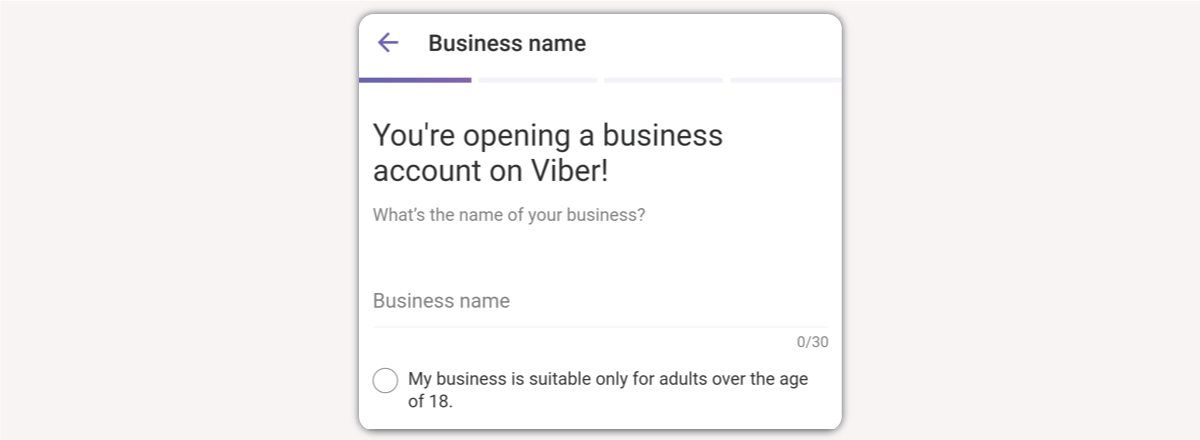
- On the next screen add the name of your business and choose whether it is suitable only for adults
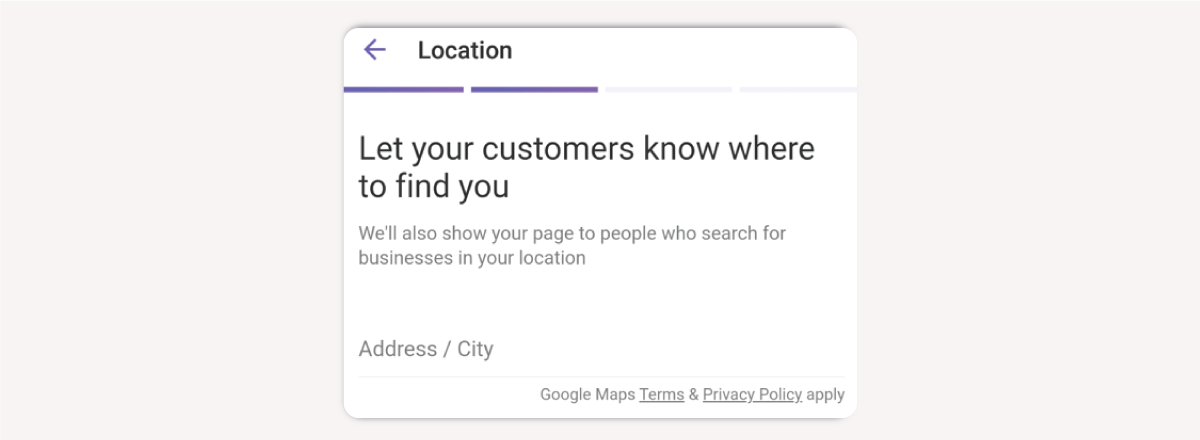
- On the next screen add the address of your business
- On the next screen add a logo for your business

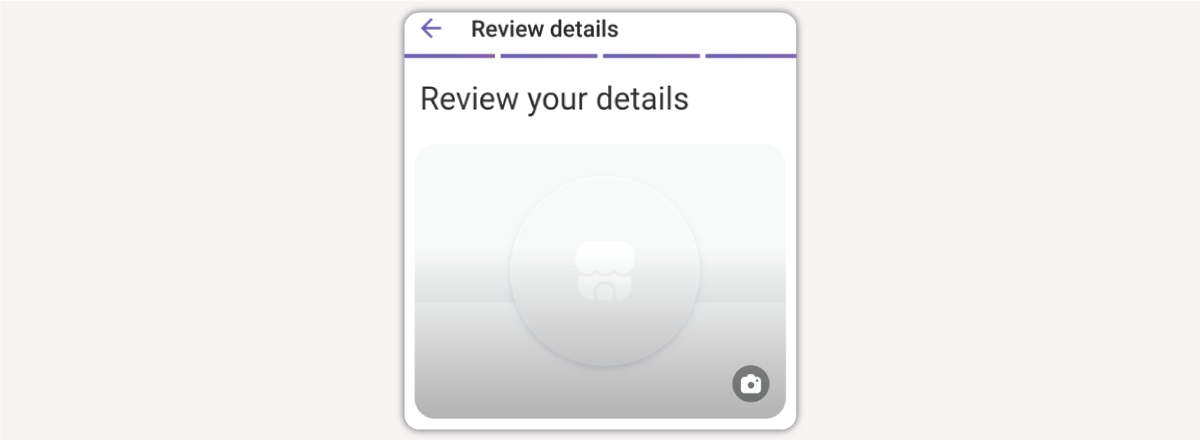
- On the last screen review all the details you have entered and click on “Publish Page”. Your small business account has just been created.
6. 3 Benefits of Viber small business accounts
Personalized Customer Service
Businesses that create small business accounts on Viber enable app users to ask questions and receive immediate answers through the convenience of a personalized chat.
More Sales Opportunities
Small business accounts can become an essential tool for small and medium businesses, as they can display and promote their products and services to a huge number of users without any cost or charges.
Rich Content
Businesses can use their small business account to send useful files, exchange images and use GIFs making the communication with customers more interactive.
Summary
Small business accounts on Viber provide businesses many features for enhancing their digital presence and attract new customers through a very popular app.
Prospects and customers can find the business through the search bar of the app and initiate conversation.
Keep in mind that small business accounts have many limitations compared to official Viber Business Accounts, which come with many more advanced features and capabilities.
How to create a Viber Channel for your Business
How to create a Viber Channel for your Business

Do you want to leverage the popularity of Viber to communicate directly with your audience on their favorite channel? Then, you are in the right place, because in this article you’ll learn what the Viber channels are, all the features and tools they provide and ways to grow your own Viber channel.
Table of Contents:
- What are Viber Channels?
- Tools for growing and managing a Viber Channel
- How can I create a Viber Channel for my Business?
- How do I manage my Viber channel?
- Viber channel tools for Businesses
- How can I add new users to a Viber Channel?
- 3 Benefits of Viber Channels for Business
- Use Cases from various industries
1. What are Viber Channels?
Viber Channels are a new service of Viber that enables brands and businesses to publish content and communicate with an unlimited number of users within the Viber app.

Unlike Viber communities where members can send messages and take part in the discussion, Viber channels allow one-way communication, meaning that only businesses can send messages to the subscribers of each channel. Subscribers can comment on the broadcast messages they receive if the administrators of the channel have allowed them to do so.
Viber Channels are a perfect tool for brands that wish to grow their audience and engage more their existing customers. In more detail using a Viber channel businesses can:
- Promote events
- Promote new offers
- Hold contests
- Organize polls and quizzes
- Schedule messages
2. Tools for growing and managing a Viber Channel

Invitation Link
A business can directly share an invitation link anywhere its potential customers may be. By publishing the link on its official website and social media accounts the business can attract to its channel a significant number of new subscribers.
Searchable Profile*
With the right use of keywords in the channel name and description businesses can show up on the search results within the app. This way Viber users can find and join a channel simply by searching for it in the main search bar of the app.

Messages Reporting
Channels provide detailed statistics for the performance of each message that a business broadcasts. The available metrics are: unique views, shares and clicks on messages that include links or videos.

Scheduled Messages
Businesses can schedule any type of message in advance and manage all scheduled messages from a single screen within the app.

Comments Moderation
The channel admins can decide which messages will be open to comments, thus driving discussions around certain topics and making the moderation easier.
3. How can I create a Viber Channel for my Business?
Step 1
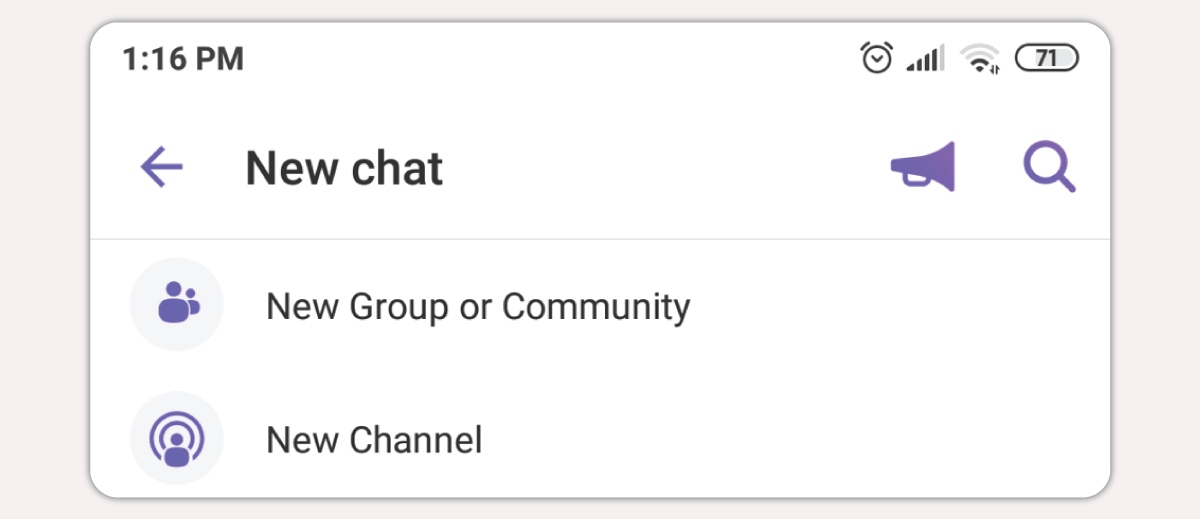
Open the Viber app and press the button “New chat”, then choose “New channel”.
Step 2
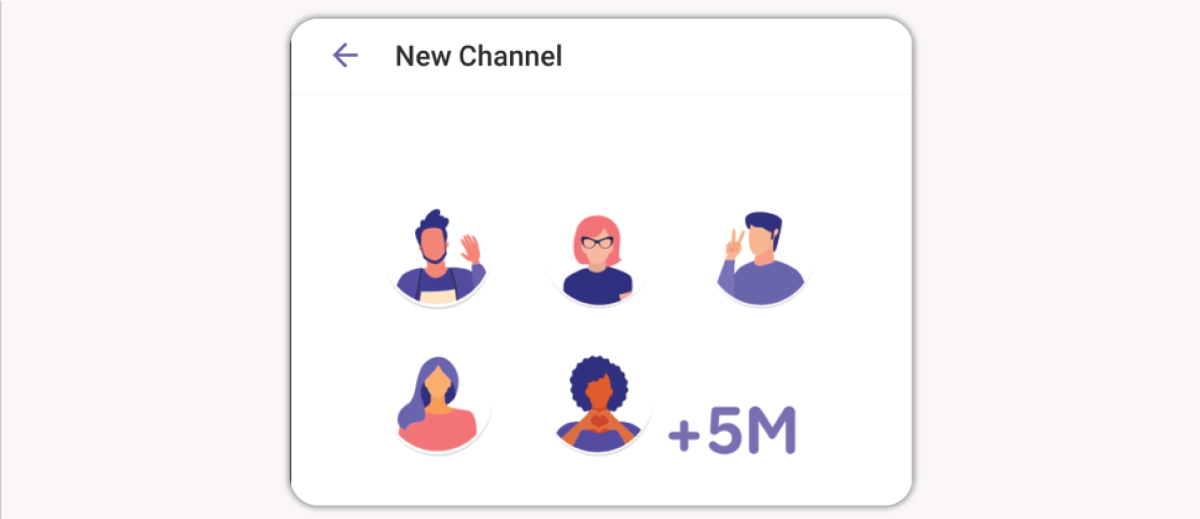
On the next screen press the button “Create a channel”
Step 3
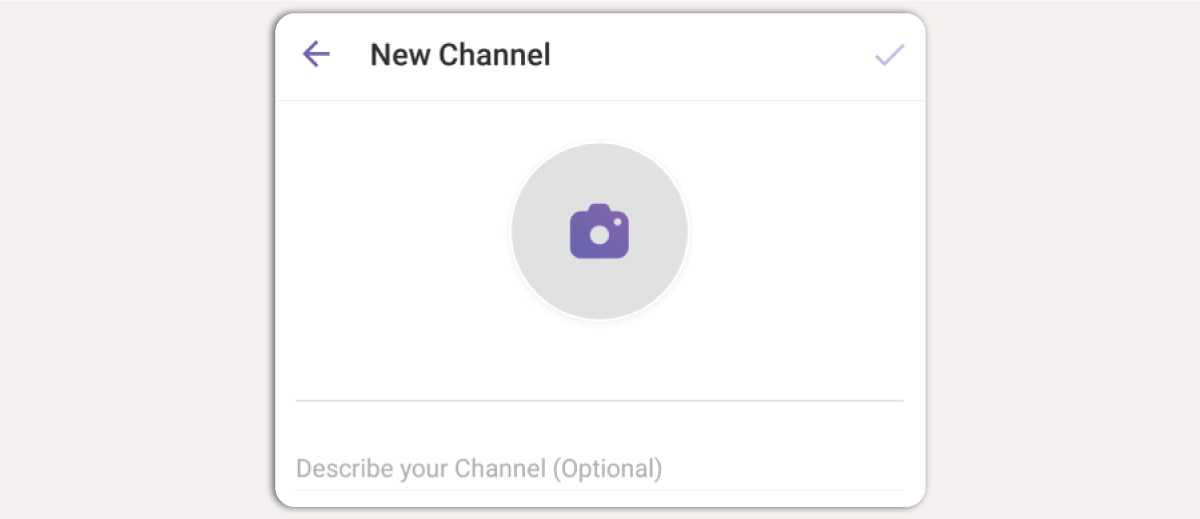
On the next screen you can Name your channel and add a short description along with an icon. At this point you can set an age restriction on your channel if you wish.
Step 4
After completing step 3, your channel is ready. A new screen appears where you can invite up to 50 of your Viber contacts.
4. How do I manage my Viber channel?

Superadmin
The owner/creator of the channel has full control and privileges

Admins
They are appointed by the superadmin and have specific privileges

Members
Are all the users that choose to join a channel
In more detail, Superadmin can:
- Add or remove members
- Pin messages at the top of the chat
- Schedule messages
- Delete one or more messages from any other member of the channel
- Create and share the channel invitation link
- Decide whether the members can share the channel invitation link
- Decide whether the admins can write in the channel
- Edit the name, description and icon of the channel
- Select which members can become admins
- Access the channel insights - analytics
An admin perform the following:
- Add or remove members
- Pin messages at the top of the chat
- Schedule messages
- Delete one or more messages written from members
- Moderate the comments
A member can perform the following:
- React to a message
- Mute channel notifications
- Chat with admins (only if the superadmin has allowed this option)
- Comment on messages (only if the superadmin has allowed this option)
- Share the channel invitation link (only if the superadmin has allowed this option)
5. Viber Channel Tools for Businesses
Viber Channels provide a set of tools and advanced features so businesses can create an attractive environment where they can interact with their subscribers.
Businesses can customize the look of the channel so it reflects their overall branding. In more detail they can set an icon for the channel and change its background.
A business can set a different alias and icon that will be displayed only when the business posts messages to the channel.
Businesses can engage the subscribers of the channel by asking their opinion with interactive polls and quizzes. This way brands receive valuable feedback and at the same time, subscribers feel that their opinion matters.
Businesses can access detailed statistics and useful insights for the overall performance of their channel. The available metrics are: active users, new users, total sent messages, reactions to messages, daily and monthly active users.
6. How can I add new users to a Viber Channel?
Invite Viber Contacts
The superadmin of a channel can send an invitation to up to 50 Viber contacts directly from within the app.
Share Channel Link
Every channel has its own unique invitation link. A business can share the channel invitation link in all its online properties such as: websites, emails, social media. Furthermore, it can convert the link to a QR code and place it in advertising leaflets or inside its stores.
Link Sharing by existing subscribers
The superadmin can allow existing channel subscribers to share the invitation link to their own Viber contacts.
7. 3 Benefits of Viber Channels for Business

Freemium Solution*
Creating a Viber channel is free and the messages you send through it are also free of charge. Viber channels are a freemium solution that can be an important tool for informing and engaging the audience.

Advanced Exposure
The Viber channel messages are displayed along with the private chats on the main screen of the app, this way the visibility of the brands increases as they are shown frequently to the subscribers.

Rich Content
Through a Viber channel, a business can share rich content messages with its audience like: images, videos, stickers, files and emojis making the campaigns more attractive.
IMPORTANT!
*Verified & Public Viber Channels
A Viber channel can be officially verified from Viber itself and thus become public - searchable. The verification process is carried out through Viber's official partners such as Yuboto.
What are the benefits of Viber Public Channels
Α. They are searchable: Viber users can easily find a channel by searching its name in the search bar of the app.
B. They are verified: The verification of a channel comes with a blue tick next to the channel’s name that increases its credibility.
Γ. Sticker Pack: In cooperation with Viber we create custom sticker packs for businesses that wish to verify their channels. Those users who download the sticker pack automatically join the channel.
Keep in mind that only Public Channels are searchable within the Viber application.
8. Use Cases from various industries
Industry
Financial Services - Market Updates and Financial Insights
Banks and financial advisors can use Viber Channels to send out regular updates about market conditions, investment insights, and financial tips.
Example:
A financial advisory firm, creates a Viber Channel to share daily market summaries,
weekly investment tips, and in-depth monthly reports on economic trends.
Subscribers get timely updates that can help them make informed financial decisions.
Industry
Health & Wellness - Health Tips and Appointment Reminders
Healthcare providers and wellness companies can use Viber Channels to broadcast health tips, news, and reminders for vaccinations or regular check-ups.
Example:
A clinic sets up a Viber Channel to share daily health and wellness tips,
reminders for flu shots, and informational content about common health conditions.
They can send notifications about available appointment slots and public health alerts.
For instance, during flu season, subscribers receive notifications about flu symptoms,
prevention, and nearby vaccination services.

Industry
News & Media - Breaking News and Daily Digests
News outlets can utilize Viber Channels to deliver breaking news alerts, daily news digests, and exclusive content to subscribers.
Example:
A news agency uses their Viber Channel to send out breaking news alerts
to keep their audience informed in real-time. Every evening, subscribers
receive a summary of the day’s top stories. The channel also distributes
weekly feature stories or interviews with prominent figures.
Industry
E-commerce - Flash Sales and New Arrivals
Online retailers can leverage Viber Channels to announce flash sales, new product arrivals, and exclusive discounts to subscribers.
Example:
An e-commerce store broadcasts messages about limited-time
offers and new product launches on their Viber Channel.
Before major shopping holidays like Black Friday, subscribers
receive a sneak peek of deals. The store also sends out monthly
roundups of trending products and buying guides.

Industry
Event Management - Event Updates and Announcements
Event organizers can use Viber Channels to keep attendees updated with event schedules, speaker announcements, and logistical information.
Example:
An event management company, creates a Viber Channel dedicated to a major annual music festival.
They broadcast lineup announcements, ticket sale dates, and festival maps. During the event,
attendees receive real-time updates about schedule changes, emergency alerts, and post-event surveys.
Summary
Viber channels are an ideal tool for businesses that want to broadcast mass messages to their audience and directly communicate offers, updates and new content.
Two significant limitations of Viber channels are that they do not support two-way communication with subscribers, nor do they allow personalization of messages.
If you want to discover even more features and capabilities that Viber offers to businesses visit our page on Viber for Business
Viber Communities for Business - The Definitive Guide
Viber Communities for Business
The Definitive Guide

Do you want to learn how to use a Viber Community for your business? In this article we discuss everything you need to know about Viber Communities, their features and ways to grow your own Viber Community.
Table of Contents:
1. What are Viber Communities?
A very useful and totally free tool of Viber is Viber communities. Communities are just like Viber groups with the difference that they can include an unlimited number of participants, which join a community because they have a common interest or passion like the fans of an athletic club.

Communities are usually used by influencers and celebrities that want to reach their followers, also businesses leverage communities to engage their audience, find new prospects and share updates or exclusive offers.
In comparison to Viber groups, which can include up to 250 members, communities have more advanced features, offer enhanced privacy for their members’ personal info and overall are a great place for businesses to interact with their customers.
2. The most important features of Viber Communities

Unlimited Members
The most significant advantage of communities is that anyone can join and so they can have unlimited members.

Chat History
New members can access the full chat history and see all the previous messages.

Management
Superadmins decide whether the members can write on the main chat or if they will only see the admins’ posts.
Engagement
The members of a community can react to messages, reply to another member or even mention other members.

Privacy
The mobile phones of all members remain hidden. This way their privacy is fully protected.

Polls & Quizzes
Businesses can create polls or quizzes to increase members’ engagement or receive useful feedback.

Searchable
Viber users can find communities they wish to join by searching them in the main search bar of the app.
3. How can I create
a Viber Community for my business?
Anyone can create a Viber community by following these steps:
Step 1
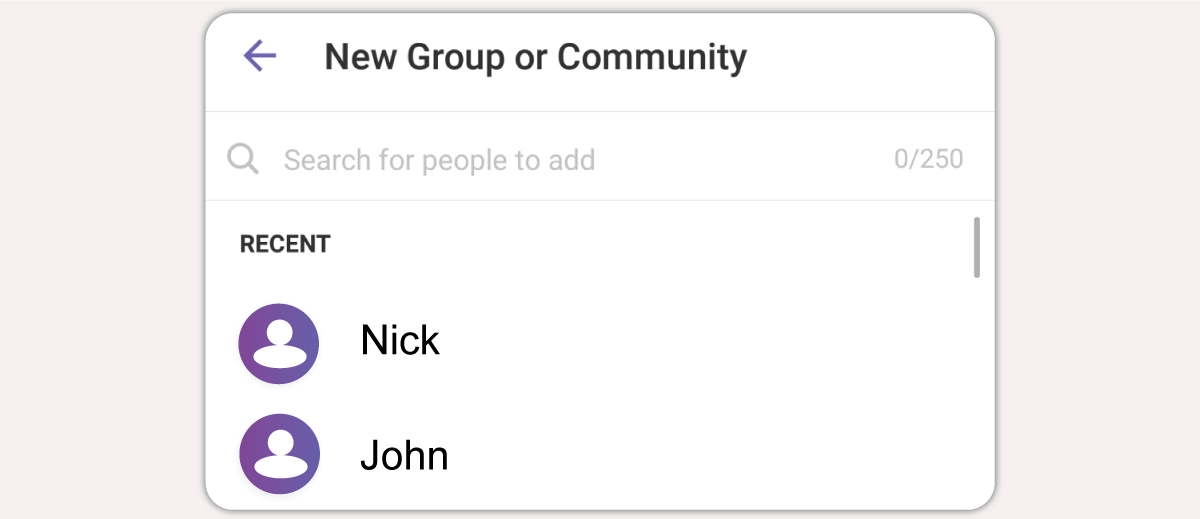
Open the Viber App and press the button “New Chat” and then choose “New Group or Community”
Step 2
Select your first community members from your contact list and press “Next”. The first members that you add will be admins. You can change their status to members after completing the set up of your community.
Step 3
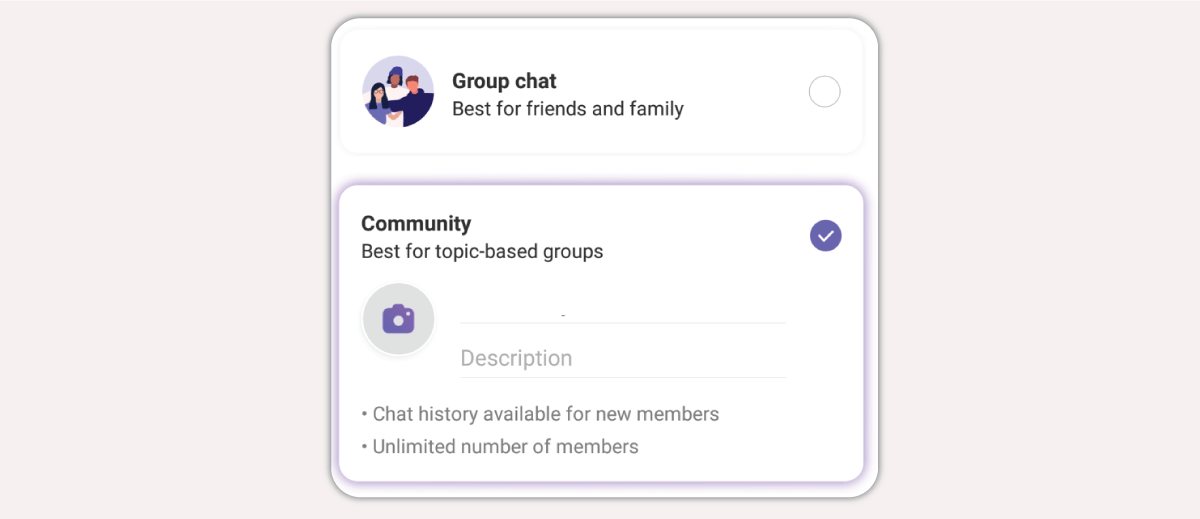
On the next screen you have to choose between a “Group chat” and a “Community”. Choose “community” and write its Name and a short description.
Step 4
Press the checkmark on the top right corner and your first Community is ready. The community will be pinned at the top of the main chat screen and all the contacts you invited will be notified.
4. How do I manage a Viber Community?
As we saw earlier, Viber communities can include an unlimited number of participants. This fact creates the need for proper administration and moderation of the discussion by businesses - owners of the community. For effective community management, Viber has set the following roles:
Superadmin
Is the owner/creator of the community and has full access and privileges
Admins
They are appointed by the superadmin and help moderate the discussion
Members
All Viber users who participate in a specific community
In more detail, a Superadmin can:
- Promote members to admins or superadmins
- Add or remove members
- Pin a message at the top of the chat
- Delete messages of a specific member
- Publish an invite link to invite new members
- Decide whether admins and members can write in the chat
Admins can help manage the community by:
- Adding or removing members
- Pinning messages
- Deleting messages
The members of a community can join the discussion and write in the main chat only if a superadmin has allowed them writing privileges.
5. How can I add new members to a Viber Community?
A significant advantage of Viber communities is that they enable businesses to invite new members by sharing an invitation link to their websites and to their official social media pages. They can also allow community members to invite their own Viber contacts.
6. 3 Benefits of Viber Communities for Business
⇒ Increased Awareness
The messages from a community are displayed along with the private chats on the main screen of the app, this way businesses acquire an additional point of frequent exposure that helps them stay in the top of consumers' minds.
⇒ Feedback Opportunities
Communities that allow their members to send messages receive valuable feedback through polls and quizzes and thus gaining a better understanding of the audience’s preferences.
⇒ Increased Engagement
By publishing frequently relevant and useful content in their communities businesses and brands can increase their customers’ engagement, boost the traffic to their official website and also improve sales.
7. Use Cases from various industries

Industry
Retail - Product Launches and Exclusive Offers
Retail businesses can create Viber Communities to announce new product launches, share exclusive offers, and provide personalized shopping assistance.
Example:
A fashion boutique creates a Viber Community for their loyal customers.
They offer an exclusive first look at new collections, time-limited discounts,
and style advice directly through Viber. Before the launch of a new summer collection,
the boutique shares sneak peeks and allows community members to pre-order.
They also host live Q&A sessions where stylists provide personalized recommendations based on customer queries.
Industry
Food & Beverage - Menu Updates and Feedback
Restaurants and cafes can leverage Viber Communities to send out daily or weekly menu updates, promote special events, and get feedback on new dishes.
Example:
A local café uses its Viber Community to post daily specials and seasonal drinks.
Members can check the catalog through the community. The cafe also uses the community to
gather feedback on menu items, creating polls to decide on new flavors or dishes to introduce.

Industry
Education - Online Courses
Schools and institutions can create Viber communities to share with the students extra course material, solve students’ questions and inform about changes in the curriculum.
Example:
An educational institution could organize weekly study sessions
for the community members where the students will discuss specific problems they face with the tutors.
Industry
Travel and Tourism - Travel Deals and Itinerary Planning
Travel agencies can use Viber Communities to offer exclusive travel deals, share travel tips, and help travelers plan itineraries.
Example:
A travel agency creates a Viber Community for travel enthusiasts.
They post last-minute deals, travel tips, and destination guides.
A member planning a trip to Greece can ask for recommendations
and get instant responses from both the community managers and fellow travelers.

Industry
Entertainment and Media - Show Announcements and Fan Engagement
Entertainment companies, including movie theaters, concert venues, and media houses, can build communities to announce upcoming shows and engage with fans.
Example:
A local theater group establishes a Viber Community for theater enthusiasts.
They announce upcoming plays, share behind-the-scenes content, and offer exclusive ticket discounts.
Members can vote on their preferred shows for the next season or suggest new themes.
Summary
Viber Communities are a proven tool for businesses that want to communicate directly and for free with their subscribers.
Their main challenges however are the addition of new members and the discussion management in cases where the community is very big. A major disadvantage is the fact that businesses cannot send personalized messages through a community.
If you want to discover even more features and capabilities that Viber offers to businesses visit our page on Viber for Business
Viber Business Messages - Complete Viber for Business Guide
Viber Business Messages
Complete Viber for Business Guide
Are you looking for new, effective and cost-efficient ways to communicate with your audience? It’s probably the right time to use Viber Business Messages.
Viber ranks among the top five messaging apps globally, and is extremely popular in Eastern Europe, the Middle East and Southeast Asia. These days Viber has more than 1 billion users worldwide and provides a great environment for businesses to market themselves and engage with an active audience.
Now you are probably wondering what exactly Viber Business Messages are and how you can open an official Viber Business Account for your business. Moreover, we assume that you would like to know the pricing of Viber for Business. In today’s definitive guide we’ll cover every aspect of Viber Business and give you a complete understanding of its features and capabilities.
Table of Contents:
1. What is Viber for Business
Viber for Business is a complete set of advanced solutions and services that Viber offers to businesses and brands to reach their audience and communicate with them effectively through the app. The available solutions of Viber for Business are:
- Viber Business Messages
- Viber Ads
- Viber Stickers
- Viber Chatbots

Viber Business Messages is the flagship product of Viber for Business and is essentially a direct communication channel for businesses, which can send bulk or personalized messages of various types to their audience. Business messages come with many capabilities and functionalities such as: rich content, template messages, detailed delivery reports.

Viber Ads are display advertisements that can be displayed in multiple placements on all the screens of the app. These ads can include: animated visuals, text and CTA Button. Furthermore, there is the option of showing videos to desktop users.

Viber Stickers
Viber for Business gives you the opportunity to create your very own branded stickers that users can download and share with friends. Branded stickers are a fun and engaging way to increase the awareness of your brand.

Viber Chatbots
Viber Chatbots enable you to be available for your customers 24/7. Automate customer support, guide users with recommended products and accept payments with a smart bot that takes off the workload of various departments.
Viber for Business and its solutions offer many effective tools for businesses across all industries and enhance their attempts to boost sales, provide faster and more targeted customer support and improve the overall communication with customers and prospects.
Start sending Viber Campaigns Today!
2. Why use Viber Business Messages
Viber Business Messages is the obvious choice for businesses looking to build profitable relationships with their audiences, as Viber is very popular and concentrates a very active and engaged audience. The average Viber user spends more than 30 minutes per day using the app to communicate with friends, family and colleagues. This level of engagement makes Viber a perfect environment for businesses to reach customers where they already are and promote their offerings effectively. All in all Viber business messaging is a must-have marketing tool these days.
Let’s see the most significant Viber for Business benefits:
1 billion users
One great advantage of Viber is the engaged audience of 1 billion active users. This number grows exponentially year after year with Viber gaining continuously new users and providing businesses with a direct and effective customer touch point. Viber Business Messages are becoming a necessary option for affordable and relevant marketing campaigns.
Two-way Communication
Real-time dialogue with customers opens up new possibilities and enhances the marketing campaigns of brands, as they are in the position of building a more personal relationship with consumers, while increasing their trust and consequently converting them to loyal customers. Two-way communication is the foundation of conversational commerce.
Advanced Features
Viber for Business provides brands and enterprises with many advanced features and useful tools for improving their communication with target audiences. In detail, brands and recipients can exchange files making customer support queries resolution faster and simpler. Moreover, businesses can send explanatory how-to videos to their customers, and customers can reply to specific messages they’ve received.
1 single channel for all communications
By using Viber Business Messages brands are in the position to send promotional messages, notifications and have conversations with their customers in one single channel, Viber. This way, campaign management is easier for the business, while recipients can search for previous messages or pin specific messages at the top of the chat. With Viber for Business the communication between brand and consumer becomes direct, faster and more efficient.
Official Verification from Viber
Trust is very important for consumers when it comes to ecommerce and online transactions. Businesses that create an official Viber Business Account gain a significant advantage as they prove their authenticity and ease the mind of their customers, which can check and validate that they interact with a verified business.
Rich Content
With Viber Business Messages there is no need to limit your communication to short texts. Brands can send images, videos, files and URLs with CTA Buttons. Additionally, customers can answer with files, photos or videos. This interactive communication with rich content increases conversions and helps businesses understand better exactly what the customers are looking for.
Low Cost
Viber for Business saves valuable resources of your marketing budget, as you do not pay for the total messages sent, but only for the Viber Business Messages that were actually delivered. Every campaign is charged according to the delivered messages. Moreover, Viber Business Messages support the Time to Live functionality, which allows businesses to set a specific time for message delivery.
Detailed Delivery Reports
Businesses that leverage Viber Business Messaging receive detailed reporting for every campaign they run. These extensive reports include advanced metrics like: delivered messages, opens, click-through-rate etc. This way businesses are able to draw very useful and valuable conclusions about the recipients’ behavior and continuously improve their next campaigns.
Personalized Messages
Viber Business Messages support the personalization of the messages’ content. Businesses can customize the content by adding the recipient's name and unique info tailored to him/her. This way the message becomes more attractive and has more chances of persuading the recipient to take the desired action.
SMS Fallback for 100% Delivery
SMS Fallback is an advanced feature of our platform with which any messages that are not delivered for any reason in Viber, are rerouted and automatically sent as SMS. For example, if some users don’t have the Viber app installed in their phones, then they’ll receive an SMS with the appropriate adjustments on the content of the message. SMS fallback guarantees maximum delivery rates that can exceed 95%.
Data Protection
Viber has end-to-end encryption for all private and group conversations and applies the same policy for Viber Business Messages. Specifically, the business messages are not stored in Viber’s servers and all the connections used are super-secure.
Integrations
Viber Business Messages support the integration with third party systems such as ecommerce platforms, this way sending notifications and transactional alerts can be automated. Viber for Business API is a robust and complete API that can serve the integration needs of any infrastructure.
Start sending Viber Campaigns Today!
3. What is a Viber Business Account
Businesses that are interested in using Viber Business Messages have to open up a Viber Business Account. Business Accounts are official pages inside the application that are verified by Viber. Think of a Business Account as an official profile with useful information about your brand.
A Viber Business Accounts includes:
- Company Logo
- Brand Name (Viber Sender ID)
- Blue Tick - Official Verification
- Chat History
- Address
- About section
Viber Business Account - Useful Features
Searchable Profiles
Users can search in the main search bar of the app for any brand they wish to communicate with and initiate the conversation. This way brands gain an additional customer touch point.
Unsubscribe Option
The recipients of Viber Business Messages can opt-out from a Viber Business Account in order to stop receiving messages at any time just by toggling a switch.
Why you need an Official Viber Business Account
Brands and businesses start to acknowledge the various benefits of Viber Business Messages and personalized messaging, so they gradually adopt Viber in their marketing mix. Banks, retailers, shipping companies and diverse businesses from all industries can leverage bulk Viber messages.
It is very important for your customers to feel that they can trust the Viber messages you send them. For this reason Viber Business Messages are explicitly sent to recipients that have opted-in and have given their consent to receive such messages. Additionally, users can check at any time whether the brand - sender of the messages is officially verified by Viber, as the official Viber Business Accounts have a blue tick next to the Sender’s Name.
Moreover, the official Viber Business Account includes detailed info about the business, its logo, address, contact number and a short description. Essentially it provides all the necessary info so that the recipients of the bulk Viber messages feel confident in communicating with that particular account.
4. Types of Viber Business Messages
Viber Business Messages are divided into 3 main categories depending on the purpose of the message and its content. Also, each type of message has a different charge.
The 3 Types of Viber Business Messages
- Promotional Messages
- Transactional Messages
- Conversational Messages
Promotional Viber Messages - Προωθητικά Μηνύματα
Promotional Viber Messages are used for advertising campaigns, promotions and sales activations. This type of messages can include: Text up to 1.000 characters, emojis, images, videos, CTA Buttons.
Use Cases
- New product launch
- Special offers / discounts
- Back in stock notifications
- Coupons
Examples

Refresh your Summer Look with a 20% discount on 5,200 t-shirts, swimwear, shorts, shoes and summer accessories! ⛱️ ⛱️
The limited offer expires today at 23:30
Free shipping for purchases >50€


Our new store on 56 Ermou Str. has just opened!
Visit us now to find unique collections, exclusive items and stock products.
We celebrate the opening with special prices for the whole week

Transactional Viber Messages
Τα transactional messages όπως υποδηλώνει και το όνομά τους είναι μηνύματα για ενημέρωση συναλλαγών και χρησιμοποιούνται για την αποστολή σημαντικών ενημερώσεων ή time sensitive alerts. Περιλαμβάνουν μόνο κείμενο + link.
Use Cases
- One Time Passwords
- Shipping notifications
- Order confirmations
- Appointment reminders
Examples
Conversational Viber Messages
Conversational Viber messages enable users to initiate dialogue with the business and they are divided in two categories: two-way and sessions. Their main difference is their pricing, see more details about two-way and sessions messages.
Charges of two-way Viber Messages
Two-way messages are charged per delivered message
Charges of Session Messages
Sessions are 24-hours time windows during which businesses can send up to 60 messages and only be charged for the 1st message. In order to start a session, a user has to initiate the conversation.
Use Cases
- Customer support
- Receive feedback
- Order management
- Post-sales support
Examples


Viber with SMS Fallback
Are you wondering what happens when recipients don’t have the Viber app installed or if they don't have internet access at the time of sending a campaign? With the advanced Fallback to SMS functionality all Viber messages that aren’t delivered for any reason are automatically rerouted and sent as SMS. Moreover, businesses can use mobile landing pages with rich content in the SMS. This way, even through the SMS channel, the campaigns are interactive and have multimedia content exactly as Viber.
Start sending Viber Campaigns Today!
5. Viber Business Messages
Best Practices for successful campaigns
There are plenty of best practices you should follow to get the most out of your Viber Business campaigns. Let’s see below some of the most important practices that will skyrocket the effectiveness of your campaigns.

Plan your campaign in advance
In order to ensure that a Viber messaging campaign will be successful it is crucial to plan it carefully in advance and decide what the objective is. First and foremost, you’ll have to define with precision the target audience of the campaign, so you can customize the content to be attractive for that audience. It may seem obvious, but the right segmentation and a corresponding targeting are the two most crucial factors for success. Therefore, you should spend time on proper segmentation and once you have decided on the target audience of the campaign, all other elements such as the message, the right time of sending and the type of campaign will be much easier to determine.

Short Texts & Attractive Visuals
Viber Business Messaging favors rich content, but that doesn't mean you have to overload the messages you send. You have to know how much is actually too much. When it comes to the text, keep your message short and clear, but at the same time try to make it smart and punchy so it will grab the attention of the recipients. Don’t forget that consumers have a very small attention span these days. Use active voice and verbs that motivate recipients to take action. When it comes to images, always use high definition visuals and don’t overdo it with many different color pallets. Try creating attractive images for your messages that will catch the eyes of the recipients.

Personalize when it’s possible
The personalization feature of Viber Business Messages will help you run even more effective campaigns. By customizing the content of each message to every recipient you achieve to create relevant messages that have more chances of converting. Consumers that receive a message that it’s personally addressed to them and has useful, relevant and tailored information are more likely to engage with it and proceed to the desired action. Additionally, personalized messages make consumers feel unique and that they are valued, thus they become more engaged with your brand and consequently can become loyal long-time customers.

Perfect the Timing
Viber Business messages, as any other marketing campaign, heavily depend on the right and appropriate timing. If you insist on sending your Viber business campaigns in bad timing then it won’t matter if your message is engaging and personalized, chances are the campaigns won't have optimal open rates. That’s why it is very important to send notifications and promotional campaigns in days and hours that actually work for your recipients. In order to find the perfect timing you need to know your audience and its habits. Take into consideration the location, age, gender, activity and interests of the audience to decide which are the best times for implementing your campaigns.

Always use Call-to-Actions
Call-to-Actions are a necessary element for any marketing message. Viber Business Messaging isn’t an exception. The correct use of impactful and persuasive call to actions can make a significant difference in the total conversions of a campaign. A few tips you should have in mind when writing call to actions for your Viber Business Messages are: use simple, concise and clear language, use impactful words that motivate the recipients to take action, use wording that’s familiar for the audience.
Start sending Viber Campaigns Today!
6. Viber for Business and Data Protection
Viber is one of the most secure messaging apps globally and has very strict policies regarding the protection of users’ data and privacy.
- All messages between businesses and consumers are encrypted end-to-end.
- Viber Business Messages can be seen only in the recipients’ devices. Viber doesn’t store these messages.
- Viber keeps customers’ data completely secure and doesn’t share them.
- Viber uses only secured servers for sending Business Messages and these servers are located in virtual private clouds.
Viber Business Messages & GDPR
Viber Business Messages just like SMS is an opt-in channel. The recipients of Viber Business Messages must have consented in receiving such messages (GDPR consent - opt-in) before businesses can contact them. Businesses are required to store and maintain proof of consent for every single recipient on their subscribers’ lists.
In cases where there is no such consent on the part of the recipient, the messages are considered SPAM and Viber applies a penalty on the sender.
Keep in mind that recipients can unsubscribe at any time.
7. Viber Business Messages Pricing & Cost
Viber Business Messages service is offered with a monthly subscription. The amount of the subscription is set based on the recipients’ country. Have a look at the official price list published by Viber here
The monthly subscription in many countries is 175,00€ and includes a minimum number of messages that you can send.
| Cost per Message Type | ||
| Promotional | Transactional | Conversational Session |
| 0,0184 € | 0,0104 € | 0,0173 € |
| Minimum Number of Messages | ||
| 9.510* | 16.826* | 10.115* |
*The minimum number of messages applies only if you send one type of message. You can combine different types of messages with the corresponding charges.
In case that the messages included in the minimum monthly subscription aren’t enough, the additional messages are also charged based on the above table. You can send messages to all supported countries with the corresponding minimum monthly subscription.
If your recipients’ lists are small or if you don’t intend to send campaigns frequently in order to utilize Viber Business Messages to the maximum, we suggest that you check alternatives like SMS Marketing and opt-in mechanisms to grow your subscribers such as Signup Forms
Summary
To sum up, Viber Business Messages enable businesses to send promotional campaigns and notifications to their customers in a fast, secure and affordable way. Additionally, they provide the option of real time dialogue between brand and consumers.
They are a powerful and ideal tool to keep your customers informed about your latest news, to provide timely and personalized customer support and of course to grow your sales. Start today with Viber Business Messages and see instant results.
If you are looking for an official Viber Business Partner, then contact us today.
Start sending Viber Campaigns Today!
SMS Marketing: Definition, its Benefits & How to Get Started

SMS Marketing:
Definition, its Benefits & How to Get Started

SMS Marketing is the perfect mobile marketing channel to increase the customer engagement, improve your brand awareness and of course skyrocket your sales!
Its effectiveness is based on its direct nature, the easy implementation and the fact that it is extremely popular among modern-day consumers, who clearly wish to receive SMS marketing messages that are relevant and have real value.
What is SMS Marketing?
SMS Marketing is defined as the sending of promotional or transactional SMS messages to people who have agreed to receive text messages from a business. These messages include time sensitive offers, notifications and alerts.
If the above definition seems too complicated, don’t worry, in today’s article we’ll see in full detail everything about SMS marketing, and how this channel can enhance the digital marketing strategy of your business.
Must-know Facts to understand the power of SMS Marketing:

98%
Open Rate:
SMS marketing comes with the highest percentage among all the available marketing channels.

Easy
& Quick:
You can send either 100 or 1.000 bulk SMS marketing messages in just a few clicks.

Instant
Delivery:
Your SMS marketing messages are delivered in real-time.
5 incredible Benefits of SMS Marketing
Businesses usually use SMS Marketing to increase customer engagement and consequently boost their sales. SMS is an ideal tool to grab the attention of the audience, as SMS messages are read within minutes.
Let’s see how SMS marketing can benefit your business and improve your bottom line giving you a competitive advantage.

1. SMS Marketing is cost-efficient
Compared to other methods and marketing channels, bulk SMS messages are one of the most affordable options to communicate with your customers. Additionally, SMS presents one of highest Return on Investment.

2. SMS Marketing equals real-time communication
SMS marketing campaigns are delivered within seconds and what’s more important, the recipients read the message nearly instantly. The majority of SMS messages are read within 3 minutes, thus SMS is ideal for time sensitive offers and important alerts.

3. SMS Marketing is trackable
In contrast to advertisements such as display ads where the possibilities for tracking are few, with SMS marketing you know exactly how many recipients clicked your link and which recipients converted. Moreover, you can see which recipients don’t engage with your messages and so you can reach them with a different strategy.

4. SMS Marketing is precise and accurate
SMS campaigns are sent explicitly to recipients that have opted-in for such communication. This way, businesses can collect valuable information for the users and their preferences during the opt-in process. By leveraging this information businesses are in the position to tailor their SMS marketing messages and send accurate campaigns.

5. SMS Marketing avoids the SPAM Folder
An important advantage of SMS marketing is that the SMS inboxes don’t have any filters that can categorize the messages as SPAM, so you ensure that your SMS will be seen.
Are you ready to start with SMS Marketing?
SMS Marketing Categories & Types of Messages
As we mentioned earlier SMS Marketing is divided in 2 categories depending on the nature and object of the communication. The 1st category is the promotional SMS that have advertising purposes and the 2nd category is the transactional SMS that have customer service purposes.
- Examples of Promotional SMS
- Limited Offers
- Coupons
- Discounts
- New product launches
- Event Invitations
- Surveys
- Examples of Transactional SMS
- Order Confirmations
- Shipping Updates
- Multi Factor Authentication
- Appointment Reminders
- Account security alerts
- Critical Notifications
Tips for effective SMS Marketing
Promotional Campaigns
Get Consent: SMS Marketing is an opt-in channel, you must not send messages without having the explicit consent of the recipients.
Concise Messages: Keep your messages short, concise and to the point. Communicate one call-to-action per message.
Segment your Subscribers: Segment your recipients in different sending lists according to their profile and preferences, so you can send always relevant content.
Include Call-to-Action: Guide recipients to take a specific action and always include a link that makes it easy for them to complete it.
Be aware of timing: You can experiment with different sending times in order to find the perfect one, but always respect common quiet hours.
Examples of useful SMS Marketing Campaigns
Promotional campaigns:
Exclusive offer
Get 20% off your next purchase when you use code SMS20 at checkout.
New product launch
We're excited to announce the launch of our new line of organic skincare products! Learn more here: yubo.to/link
Flash sale
Get 50% off all shoes for a limited time only.Visit now our e-commerce store.
Event invitation
You're invited to our exclusive VIP event on [date and time] at [location]! Reserve your spot here: yubo.to/link
Blog post notification
We just published a new blog post on [topic]! Click here to read it: yubo.to/link
Are you ready to start with SMS Marketing?
Transactional campaigns
Order confirmation
Thank you for your order! Your order number is 1234567890. We will send you a shipping confirmation once your order has shipped.
Shipping update
Your order is on its way! You can track your shipment here: yubo.to/link
Appointment reminder
You have an appointment booked for [date and time] at [location]. Please arrive 15 minutes early.
Password Reset
We received your request for resetting your password. Use the One Time Password 12356 to login and reset your password.
How to get started with SMS Marketing
It’s fairly easy to adopt SMS Marketing and use it in your overall strategy. The only thing you need to get started is a reliable SMS marketing platform with advanced and useful features.
Key Features of an advanced SMS Marketing Platform

Opt-in Mechanism
Look for a platform that provides opt-in forms that you can easily embed in your website in order to collect valuable customer data and the consent of future recipients.

Personalized Content
An SMS campaign to have maximum impact and results has to be relevant and tailored for each recipient. So choose a platform that supports the personalization of the messages’ content.

Detailed Reporting
To continuously improve your future campaigns, you need to know what works, so look for an SMS marketing platform that provides you with detailed reports on delivered messages, opens and clicks.
Summary
SMS Marketing is a powerful tool for businesses of all sizes as it is affordable, direct and non-intrusive. It comes with high open rates, instant delivery and has the ability to boost sales.
To use SMS marketing effectively, start by building your subscriber lists and collecting their consent. Next, choose an SMS marketing platform with advanced features such as content personalization and detailed analytics.
Start SMS Marketing today to boost engagement and increase your sales!
Are you ready to start with SMS Marketing?
Octapush Webhooks – Update of external CRM/ERP systems with POST or GET method
Octapush Webhooks – Update of external CRM/ERP systems with POST or GET method
Webhooks are user-defined HTTP callbacks that can be used to inform/update external CRM/ERP systems when an event occurs such as the status change of a message.
You can find them in the Developers link that is located in the user menu at the top right corner of the platform.
The panel to configure your webhooks is placed at the bottom of your screen.
In case you cannot see the Webhooks panel as it is shown in the below image, please contact our support department to activate the webhooks in your account.
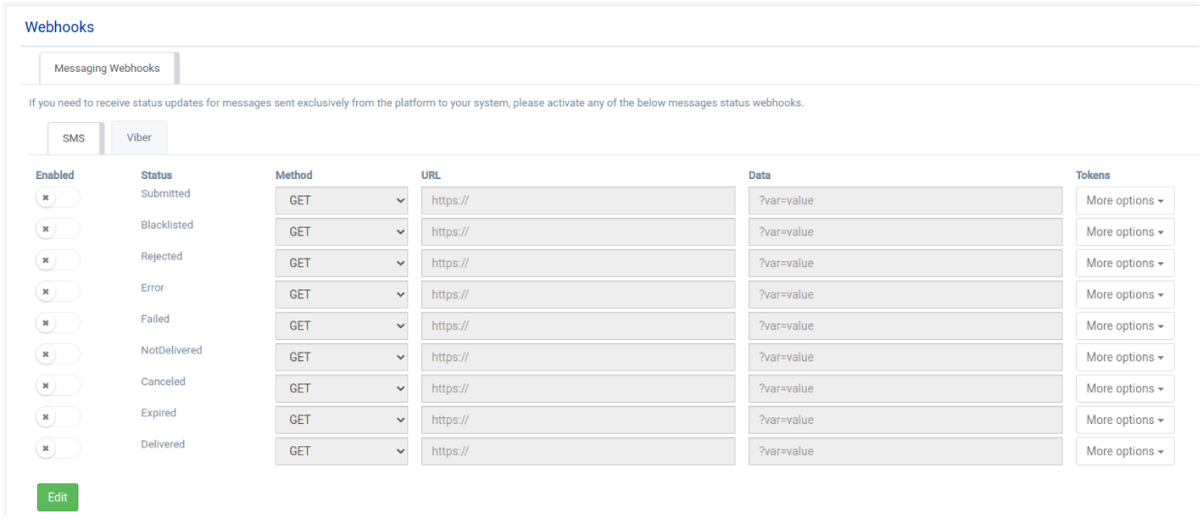
Octapush will send an HTTP callback each time a specific event takes place for which you’ve set to receive updates. You can select between POST or GET method and furthermore during the call you may include all the information that Octapush has on the specific recipient. This is possible thanks to the available tokens that you can include in your link.
Messages Statuses
When a message is sent through Octapush, it can take different statuses that inform us whether it was delivered on not and the reasons why. If the status is final, then we’ll not receive any further updates about the corresponding message, otherwise, the message hasn’t reached its final state and there will follow more updates.
The following table includes all the available statuses that an SMS or Viber message can take along with a brief explanation for each one.
|
Status |
VIBER |
SMS |
Explanation |
Final |
|
Sent |
|
|
The message has been sent to the final network to be delivered |
NO |
|
Pending |
|
|
The state of the message is not yet known |
NO |
|
Submitted |
|
|
The message has been routed for sending |
NO |
|
Scheduled |
|
|
The message has been scheduled for sending in a future time |
NO |
|
Fallbacksms |
|
|
The message wasn’t delivered via Viber and it has been forwarded for sending via SMS |
NO |
|
Not Delivered |
|
|
The message was not delivered |
YES |
|
Unknown |
|
|
The message took another status from the ones we have available |
YES |
|
Error |
|
|
Error during the sending process |
YES |
|
Expired |
|
|
The message wasn’t delivered within the time frame we’ve set |
YES |
|
Failed |
|
|
Sending failed due to insufficient balance in your account |
YES |
|
Rejected |
|
|
A message is rejected when the system rejects it’s sending due to routing reasons. Wrong number or not supported termination to a specific network are common reasons. |
YES |
|
Canceled |
|
|
The sending of the message has been canceled |
YES |
|
Seen |
|
|
The recipient has seen the message. |
YES |
|
Clicked |
|
|
The recipient has clicked a link in the message |
YES |
|
Blacklisted |
|
|
The recipient’s number is blacklisted |
YES |
|
Unsubscribed |
|
|
The recipient clicked on the unsubscribed option |
YES |
|
Blocked |
|
|
The Viber Sender Id that sent the message has been blocked |
YES |
Tokens
The main tokens that our platform provides are: Phone Number, First Name, Last Name, Title, Option 1, Option 2.
In case you’ve created extra fields in your list, for example a custom ID, then this will be shown as token and you can use it with the webhooks that you’ll create.
Create Webhooks
To create a new webhook you have to select the channel you want this webhook to be used. The choices are two: SMS or Viber.
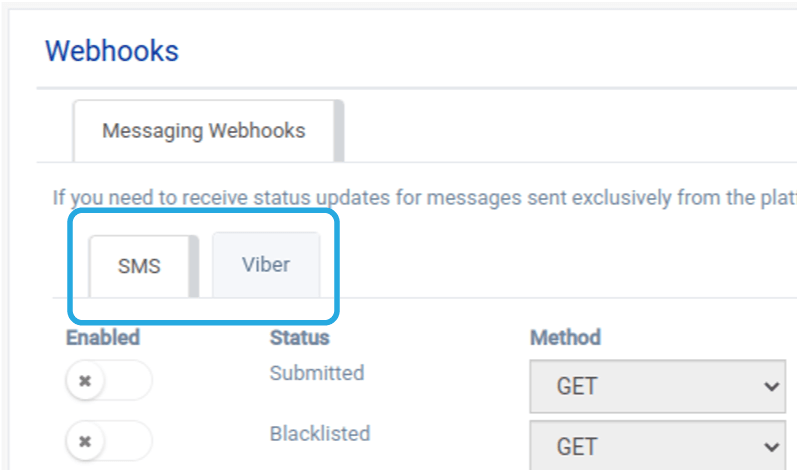
Then, you click on the Edit button at the bottom of the page and you are ready to activate the webhooks for any of the provided statuses, as you can see below.
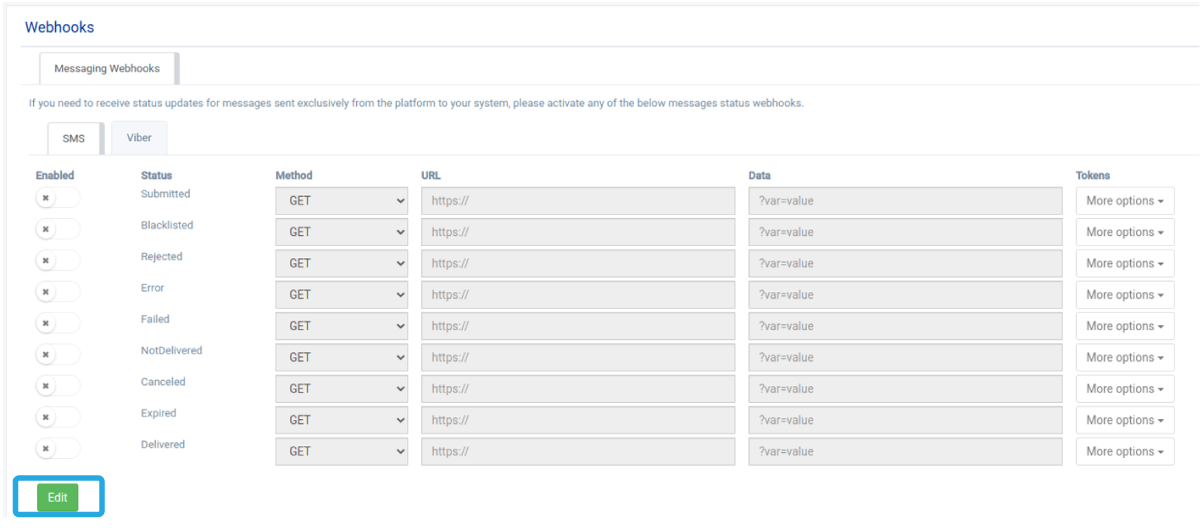
In case we want to receive an update in an external system for an event that occurs in Octapush, we have to activate the switch on the left side of this event, set the URL that will receive the callback and set the variables we want to be included.
If we want to use the GET method for the blacklisted status, then we’ll have to fill in the form as shown below.

If we want to use the POST method for the submitted status, we’ll have to use the JSON format as shown below.

More information about the JSON format you can find in the following link: https://www.w3schools.com/whatis/whatis_json.asp
Viber launches Business Inbox and upgrades Business Accounts
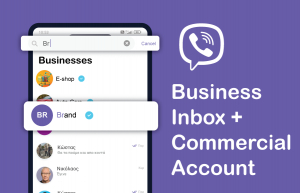
Viber launches Business Inbox and upgrades Business Accounts
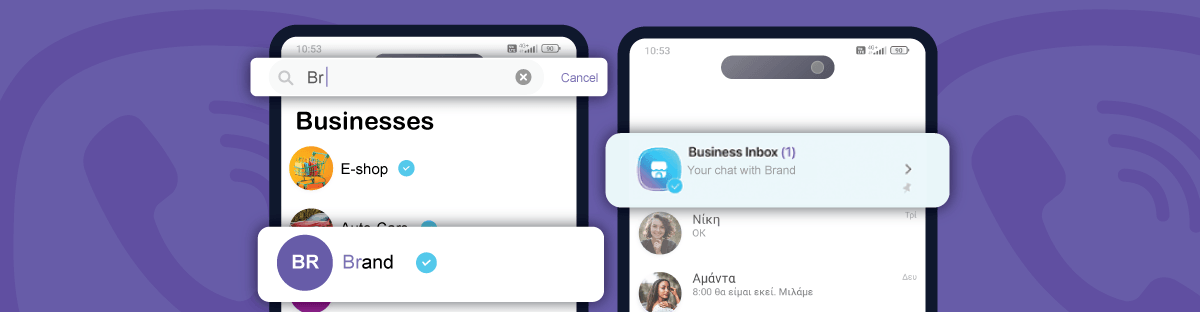
On January 23rd Viber is launching 2 new global updates on Viber Business Messages. In order to improve the user experience and become even more effective for brands, Viber will launch Business Inbox and Commercial Accounts.
Exclusive Business Inbox for Brands
From now on all Business Messages and conversations between brand and user will be placed in a dedicated folder, the Business Inbox, which will be accessible directly from the regular Chats Screen. Users will find all the brands’ messages inside the Business Inbox.
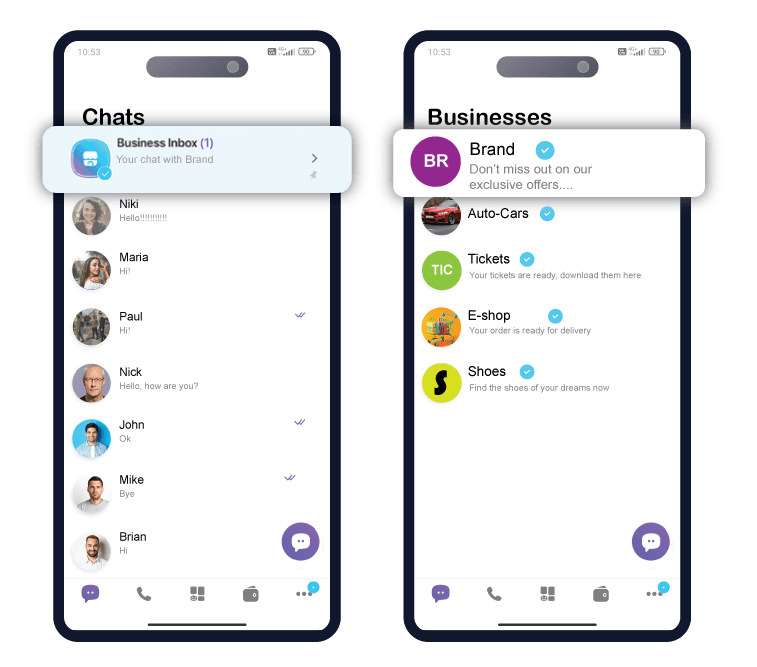
How does Business Inbox work?
- Once the first business message is received, Business Inbox folder is created in the chat list.
- By default, all business messages go to the Business Inbox folder.
- The Business Inbox folder is pinned to the top (users can unpin it if they wish).
- When a new message arrives in Business Inbox, a notification is displayed on the locked screen.
- Users can pin a particular business conversation to the top of Business Inbox.
- Users can move any business conversation to the regular Chats screen.
Start sending Viber Campaigns Today!
Business Accounts are upgraded to Commercial Accounts
Commercial Account will replace Business Account allowing users to search a brand, discover all its information and see the available communication channels, all in one place.
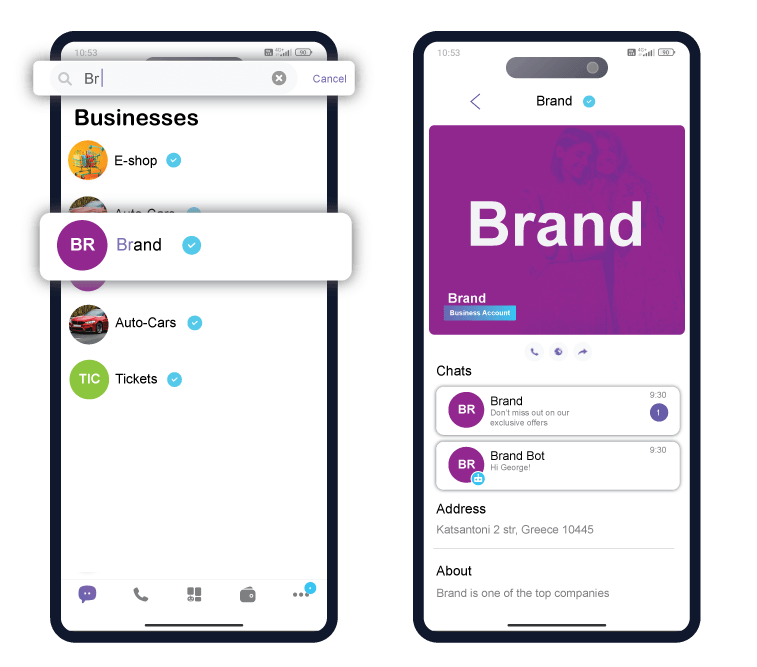
What you should know about Commercial Account
- Users will be able to search for a brand and initiate conversation with it.
- When a user initiates a conversation with a brand, it will be considered as opt-in, thus the brand be able to send promotional messages to the specific user.
- Your commercial account will include all the information that Business Profile showed until now.
- In the commercial account there will be available all the communication channels of the brand e.g., Business Messages and Chatbot.
- Soon Viber will launch even more features for the commercial accounts such as the promotion of special offers within the page.
Start sending Viber Campaigns Today!
SMS or Viber Marketing: Which channel should you choose?

SMS or Viber Marketing:
Which channel should you choose?
SMS and Viber marketing are two very popular mobile messaging communication channels that are used by enterprises and businesses in order to communicate effectively and directly with their customers. Each channel has its own advantages and disadvantages, and the selection between the two is depending on the goals and needs of your marketing campaigns. Today we will explore the pros and cons of each channel, as well as when they should be used.

SMS Marketing
SMS marketing provides the capability of sending text messages to your customers via mobile phones. These messages can include short text, links to mobile landing pages, short trackable URLs and unsubscribe links.
Advantages:
- Wide coverage: SMS messages reach nearly every single mobile device, as there isn't the requirement of having installed any additional application in the phone.
- High open rate: SMS messages present the highest open rate amongst all the available marketing channels and recipients actually read them within minutes after their delivery.
Start SMS Marketing today!
Viber Marketing
Viber marketing requires the use of the Viber instant messaging application and allows the sending of richer messages, such as: images, videos and of course text. Furthermore it supports the SMS fallback functionality that reroutes all the undelivered Viber messages and automatically resends them as SMS messages.
Advantages:
- Rich content: Viber allows the sending of more interesting and interactive content to your customers.
- Better reporting: Viber provides plenty and detailed statistics on the performance of each campaign. These in depth analytics allow for better understanding of the audience and continuous optimization.
Start Viber Marketing today
When should you use SMS and Viber Marketing
SMS Marketing
- When you wish to reach a wide audience, regardless of the type of mobile device or the installed applications.
- Choose SMS if you want a simple and short communication that focuses on text and links.
- SMS is your channel if you seek high open rates and fast engagement of the recipients.
Viber Marketing
- When you want to promote rich and interactive content like images, video and enhanced text.
- When your customers are mainly Viber users.
- Viber is your channel if you seek advanced and detailed reporting and statistics on the campaigns performance.
Both SMS and Viber Marketing provide you with powerful features and capabilities to communicate with your audience. The selection of one channel over the other depends on the goals and requirements of your marketing campaign, and the audience you are targeting. By combining the strong aspects of each channel you can form a cohesive and effective mobile marketing mix.
Are you ready to start with SMS and Viber Marketing?